
Blog
Odoo hosting: options, requirements and how to choose (2026)
By Anthony Marchand18 min read
Contents
Odoo hosting is the question that comes right after choosing Odoo as your ERP: where and how should your Odoo instance run?
The choice of hosting isn’t just a technical issue, it’s a key lever for your company’s performance, security and scalability. Good hosting ensures that your Odoo runs smoothly, adapts to your needs over time, and remains secure in the face of digital risks.
Today, you have several options: Odoo SaaS, Odoo On-Premise, Odoo.sh, Ofleet, and other customized solutions. Each has its advantages and limitations, and the right choice depends on your specific needs: flexibility, customization, technical management, budget, compliance…
This guide describes each Odoo hosting option, what it implies for your team, and the criteria that help you choose. A short FAQ at the end answers the most common questions on requirements, storage limits and alternatives to Odoo.sh.
Odoo hosting options and types#
Odoo SaaS (Odoo Online)#
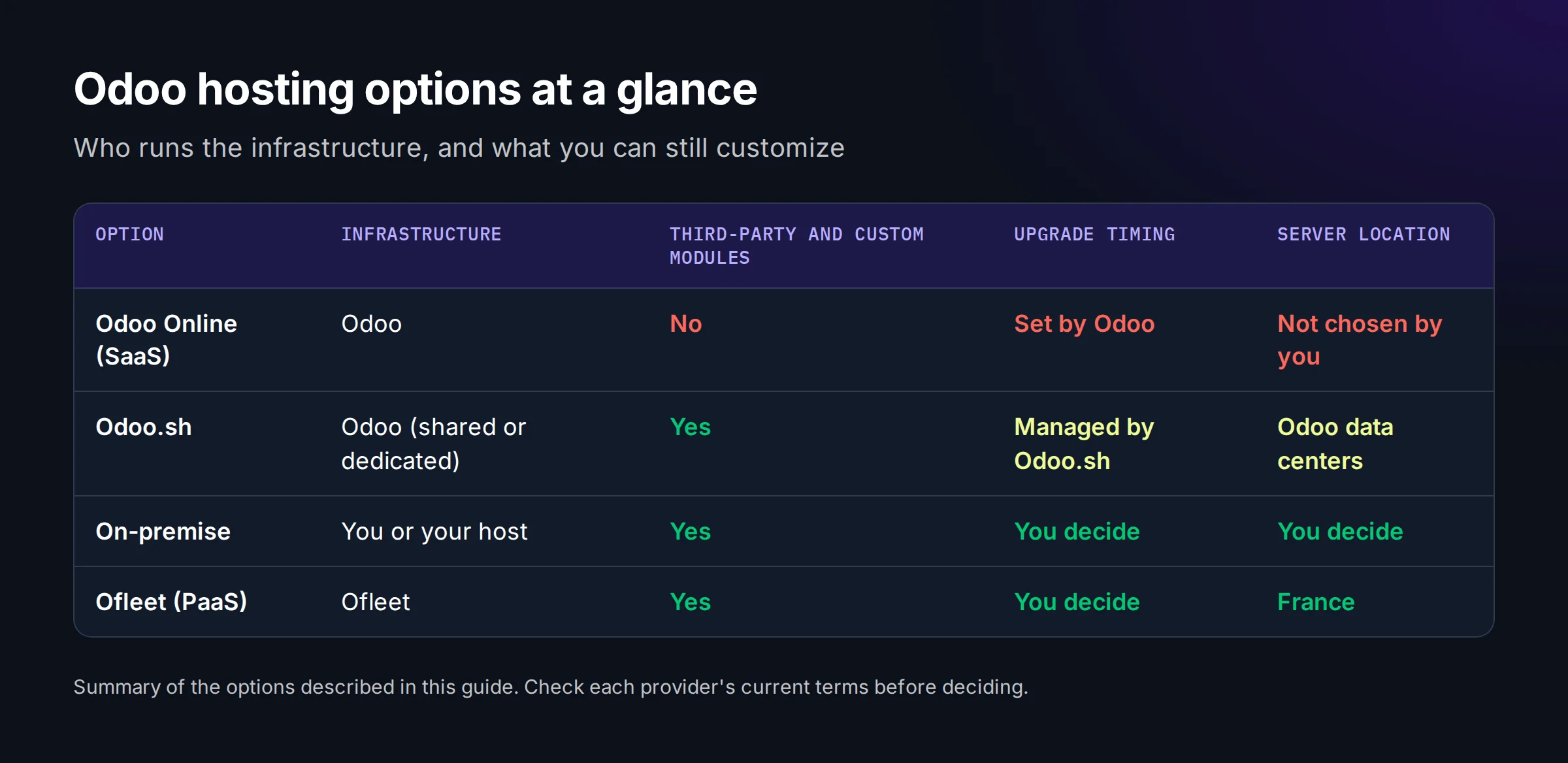
Odoo offers a version called “Odoo SaaS”, also sold as Odoo Online. In this version, everything is hosted and managed directly by Odoo from an infrastructure point of view. You’ll be using Odoo software without having to manage anything.
In this version, Odoo takes care of the hosting costs, which means it’s free. You simply buy the software licenses, and everything else is included.
This version nevertheless imposes several limitations:
- Limited customization:
- Third-party modules: Custom or third-party modules cannot be installed on Odoo SaaS. This limits your ability to adapt the platform to your company’s specific needs.
“Third-party modules” are those available on the Odoo App Store (nouvel onglet). “Native modules” are those present and installable by default in an Odoo instance.
- Specific developments: Custom developments (outside the Odoo Studio application) cannot be deployed, limiting flexibility for specific functionalities.
- Limits on the size of uploaded files:
- Application Website: The maximum size of uploaded files is 256 MB, with no possibility of increasing.
- Documents application: The limit is 64 MB, which can be increased to 256 MB via system settings.
- Attachments: Attachments have a 128 MB limit, which cannot be modified.
- Limits on global storage:
- According to the SaaS platform’s terms and conditions, storage is unlimited, but “Unlimited storage: On Odoo Online (SaaS), accounts exceeding 100GB of storage may be reviewed to maintain optimal performance for all users. Customers can be invited to migrate to Odoo.SH for a controlled storage solution, or to reduce their usage by compressing or deleting excess data.”
- Restricted access to infrastructure:
- Users have no access to the underlying servers, which prevents any direct intervention on the infrastructure, such as performance optimization or advanced system configuration. Certain actions can be managed by the manifest file from your repository.
- Restricted edition:
- You will only be able to use Odoo’s enterprise edition (for a fee).
- Limited integration:
- Some complex integrations with external systems can be difficult or even impossible, due to access and customization restrictions.
- Dependence on Odoo updates:
- Updates and enhancements are managed by Odoo. You won’t be able to choose whether or not to upgrade.
- Backups and data recovery:
- Although Odoo provides regular backups, you have no direct control over the backup process or data recovery procedures.
- Compliance and location:
- You can’t control where your data is stored, which can raise compliance issues.
Odoo on-premise#
The Odoo On-Premise version offers local installation of the Odoo solution on the company’s own servers, or on a dedicated server hosted by a service provider. This version is often chosen for companies with specific needs in terms of customization, security and data control. It does, however, have its limitations and requirements.
- Total control:
- You have complete control over infrastructure, data and security. This gives you absolute control over performance, confidentiality and customization.
- Advanced customization:
- Unlike Odoo SaaS, this version allows you to install third-party modules, create specific developments and integrate Odoo with external systems.
- No direct dependence on Odoo for day-to-day management:
- Updates, backups and maintenance are managed locally.
Limitations of the On-Premise version:#
1. Technical management entirely at the company’s expense#
- Requirement: You must have a qualified technical team capable of installing, configuring and maintaining Odoo.
- What this means:
- Manage manual Odoo system updates.
- Ensure server security against attacks (firewall, DDoS protection, SSL certificates).
- Monitor server performance to avoid slowdowns or downtime.
2. Responsibility for backups and data recovery#
- Requirement: Regular backups (daily, weekly) are crucial to prevent data loss.
- What this means:
- Use automatic backup tools.
- Check backups regularly to ensure their reliability.
- Plan a disaster recovery strategy (Disaster Recovery Plan) in the event of a major breakdown.
3. Infrastructure costs#
- Requirement: Costs associated with purchasing or leasing servers, network hardware and electricity can be high.
- What this means:
- Invest in high-performance servers to guarantee a good user experience.
- Plan additional resources for future growth.
4. Complexity of updates#
- Requirement: Unlike Odoo SaaS, where updates are automatic, you need to manually manage the installation of new Odoo versions.
- What this means:
- Check module compatibility before upgrading.
- Test in a staging environment before deploying in production.
- Schedule downtime for updating.
5. Security and legal compliance#
- Requirement: Data security is your sole responsibility.
- What this means:
- Ensure compliance with local and international regulations (e.g. GDPR).
- Implement monitoring and intrusion detection tools.
- Keep security patches up to date.
6. No direct Odoo support#
- Requirement: You do not benefit from Odoo’s direct support for technical incidents (unless you have a contract with a third-party service provider).
- What this means:
- Troubleshoot system errors.
- Consider a managed services contract with a certified Odoo partner for regular support.
7. Limits to immediate scalability#
- Requirement: If your business is growing fast, local servers can quickly become outdated. The Odoo server requirements article shows when a machine stops keeping up.
- What this means:
- Provide scalable servers to handle the increase in users and data.
- Set up an architecture capable of handling peak loads.
In a nutshell:#
| Aspect | What you have to manage yourself |
|---|---|
| Infrastructure | Purchase, configuration and maintenance of servers. |
| Updates | Version management, compatibility testing. |
| Security | Firewalls, SSL, backups, protection against cyber attacks. |
| Support | Bug resolution, technical incidents and troubleshooting. |
| Performance | Optimization of hardware and software resources. |
| Scalability | Adding hardware capacity to support growth. |
| Compliance | Compliance with local and international regulations. |
Odoo.sh#
Odoo.sh is a managed cloud platform that combines the advantages of cloud hosting with the advanced customization possibilities offered by Odoo On-Premise. It’s an excellent solution for companies wishing to benefit from a scalable, customizable environment without having to manage the technical infrastructure in-house.
This PaaS (Platform as a Service) is based on a shared infrastructure of virtual machines and dedicated servers.
There are 2 Odoo.sh offers:
- Shared offer: you share your infrastructure with other Odoo.sh users. This offer is limited to 8 workers and 512GB of storage (for all your environments).
- Dedicated offer: you have your own dedicated server that Odoo.sh administers for you. In this case, your limits are 256 workers and 4096GB of storage (for all your environments).
Odoo.sh features:#
- Dedicated cloud hosting for Odoo:
- The servers are specially optimized to run Odoo in ideal conditions.
- Advanced customization:
- Users can install third-party modules and carry out customized developments directly in their Odoo environment.
- Integrated management tools:
- Odoo.sh includes integrated tools for development, testing, deployment and version management.
- Automatic backups:
- The platform offers regular backups and an integrated disaster recovery system.
- Scalability:
- Odoo.sh can easily grow with your business, notably by increasing the resources allocated to it.
Odoo.sh limitations:#
1. Potentially high cost for large companies#
- Requirement: The cost of Odoo.sh is based on provisioned resources (CPU, RAM, storage, etc.), which can become onerous for companies with very large requirements. The Odoo pricing article works out this cost for 10 and 30 users.
- What this means:
- Allow for a variable budget depending on use.
- Monitor resources consumed to avoid cost overruns.
2. Infrastructure limitations imposed by Odoo.sh#
- Requirement: You are limited to the technical configurations available on Odoo.sh. Unlike On-Premise hosting, you can’t directly modify servers or use custom hardware.
- What this means:
- Accept the platform’s performance constraints.
- Use integrated optimization tools to adapt to growing needs.
3. Limited access to underlying infrastructure#
- Requirement: Users have no direct access to servers or database at system level. All operations must be performed via the Odoo.sh interface or tools.
- What this means:
- Adopt the management practices and tools provided by the platform.
- Rely on APIs and interfaces for complex tasks.
4. Complex customizations for non-developers#
- Requirement: Although Odoo.sh allows customization, it requires development expertise to configure or adapt the environment.
- What this means:
- Have in-house skills or work with a certified Odoo partner for specific developments.
5. Dependence on Odoo support#
- Requirement: Odoo.sh support is provided by the Odoo team, and response times may vary according to contract levels or problems reported.
- What this means:
- Accept a certain dependence on Odoo support to resolve technical incidents.
- Complement this assistance with third-party partners in case of urgent needs.
6. Limits on file management#
- Requirement: There are limitations on file size and storage management.
- What this means:
- Check storage consumption regularly.
- Implement complementary solutions to manage high storage requirements.
In a nutshell:#
| Aspect | What you need to manage with Odoo.sh |
|---|---|
| Infrastructure | No direct management; depends on Odoo.sh. |
| Personalization | Requires development skills for advanced needs. |
| Updates | Managed automatically by Odoo.sh, but requires impact testing. |
| Security | Managed by Odoo.sh, but users must respect best practices. |
| Support | Depends on Odoo team and available service levels. |
| Performance | Need to monitor resources consumed via the platform. |
| Scalability | Scalable, but costs rise with consumption. |
| Compliance | Provided by Odoo.sh for global standards, but check specific local requirements. |
Ofleet#
Ofleet (nouvel onglet) is an Odoo hosting PaaS platform. It offers a flexible and powerful alternative to Odoo.sh, enabling integrators and enterprises to deploy any customized Odoo configuration while only paying for the resources actually consumed.
Ofleet.cloud features:#
- Configurable resources:
- Workers, CPU and RAM can be configured according to the specific needs of each project.
- Very high storage limit (10 TB), offering great flexibility for projects of all sizes.
- Direct, secure access to databases:
- PostgreSQL is securely accessible via the Internet, facilitating data management and maintenance operations.
- Customizable backup schedule:
- Users can configure the frequency and scheduling of backups to suit their specific needs.
- Choice of Odoo version:
- The Odoo version is chosen when you create each Test or Production instance, so that a project can stay on its current version until its upgrade is ready.
- Servers and governance 100% in France:
- Servers, data and governance are in France, which simplifies GDPR documentation and keeps latency low for users in France.
- Optional Odoo updates:
- Users have control over the application of updates, enabling them to schedule upgrades according to their operational constraints.
- Odoo Community and Enterprise support:
- Ofleet.cloud supports both Community and Enterprise versions of Odoo, offering flexibility in the choice of license.
- Advanced roles and permissions system:
- Precise management of access rights and roles, enabling fine-tuned administration of user authorizations.
- Full API:
- A documented API is available to automate workflows and integrate Ofleet.cloud with other systems.
- Fixed IP:
- Projects benefit from fixed IP addresses, facilitating network configuration and integration with external services.
- Hourly rates:
- Invoicing is based on the hourly use of resources, optimizing costs by only paying for what is actually consumed.
- Compatibility with several versioning tools:
- Works with GitHub, GitLab, Bitbucket, offering flexibility in your choice of source code management tools.
- Customizable test environments:
- Blank test environments or test environments based on production data can be created according to specific project requirements.
- Designed specifically for integrators:
- Ofleet.cloud is designed to meet the needs of integrators, with functionalities adapted to the management of multiple projects and customers.
Ofleet limitations:#
- May require technical skills for complex deployments:
- Requirement: The flexibility offered by Ofleet requires a good understanding of Odoo configurations and hosting infrastructure.
- What this means:
- Rely on in-house skills or on your Odoo integrator to configure your instances.
- Update management left to the user:
- Requirement: Odoo updates are not automatic, requiring planning and execution by the user.
- What this means:
- Provide procedures for testing and deploying updates to ensure application stability and security.
- Cost of resource use:
- Requirement: Hourly rates can lead to variable costs depending on resource utilization.
- What this means:
- Regularly monitor resource consumption to optimize costs and avoid unexpected expenses.
In a nutshell:#
| Aspect | What you need to manage with Ofleet |
|---|---|
| Infrastructure | Configure and adjust resources according to the specific needs of each project. |
| Personalization | Requires technical skills to take advantage of advanced configuration options. |
| Updates | Plan and execute Odoo updates according to operational needs and constraints. |
How to choose your Odoo hosting: the criteria#
Now that you’ve got an overview of the different hosting options for Odoo, how do you make the right choice? Each solution has its advantages, but to find the one that really suits your business, here are the essential criteria to consider.
Budget#
Hosting is a cost to be anticipated. Here are the main elements that will impact your bill:
- Servers: If you manage your own infrastructure (Odoo On-Premise), you’ll need to plan for the purchase or rental of machines, electricity, maintenance… With Odoo SaaS, Odoo.sh, or Ofleet, everything is included in the price.
- The pricing model:
- Fixed subscription (e.g. Odoo SaaS, Odoo.sh) → Ideal for cost control, but with limits.
- Pay-as-you-go (e.g. Ofleet) → You only pay for what you use, but this requires resource monitoring if your needs change frequently.
- Minimum fees: Some solutions impose a higher or lower entry fee. For example, Odoo SaaS includes free hosting with the subscription, whereas a dedicated server can cost several hundred euros per month.
For a clear price comparison between Odoo.sh and Ofleet, you can use our simulator below.
Customization#
If you intend to use Odoo “as is”, Odoo SaaS may suffice. But if you have specific needs (addition of third-party modules, in-house developments, specific integrations), some solutions are more suitable:
- Odoo SaaS → Very limited customization (no third-party modules or specific developments).
- Odoo.sh and Ofleet → Allow advanced customization and installation of tailor-made modules.
- On-Premise → Total freedom, but requires technical skills.
Technical complexity and in-house skills#
Odoo hosting can be turnkey or totally DIY.
- Odoo SaaS → No technical management, everything is taken care of.
- Odoo.sh and Ofleet → Simplified management, but you still need a minimum of knowledge to exploit its full potential.
- Odoo On-Premise → You manage everything from A to Z: infrastructure, updates, security… This isn’t necessarily a problem if you have an IT team, otherwise it can quickly become complicated.
Scalability#
As your business evolves, so must your hosting.
- Odoo SaaS → Simple, but with limitations (storage, customization).
- Odoo.sh and Ofleet → Resources adjustable to the load; Ofleet bills them by the hour of use.
- On-Premise → Scalability dependent on your infrastructure (adding servers takes time and money).
Security and compliance#
Your ERP data is sensitive: customers, orders, invoices… You need to make sure it’s well protected and compliant with regulations (GDPR in Europe, for example).
- Odoo SaaS and Odoo.sh → Security managed by Odoo, but data storage on their servers (not always in Europe – in any case no contractual assurance).
- Ofleet → Servers, data and governance in France.
- On-Premise → You manage everything, so it’s up to you to ensure data protection.
Performance and availability#
A slow or unavailable ERP means lost productivity and sales.
- Odoo SaaS and Odoo.sh → Optimized infrastructure, but shared with other customers (except as part of Odoo.sh’s dedicated server offering).
- Ofleet → Performance adjustable to your needs (choice of CPU and RAM resources).
- On-Premise → Depends entirely on your hardware and the maintenance you carry out.
Technical support#
- Odoo SaaS and Odoo.sh → Support provided by Odoo, but depends on contract level.
- Ofleet → A self-service platform: you or your integrator operate the instances; during the trial, an account manager answers your questions.
- On-Premise → It’s up to you to manage or outsource.
Backup management#
Good hosting includes regular backups and a simple way of restoring your data in the event of a problem.
- Odoo SaaS → Automatic backups, but no direct control.
- Odoo.sh and Ofleet → Automated backups; on Ofleet, you can also trigger a manual backup, schedule backups or clone an instance.
- On-Premise → It’s up to you to set up a reliable backup system.
In a nutshell#
Every company has different needs, and there’s no one-size-fits-all solution. Here’s a simple approach to guide your choice:
- A turnkey solution, no customization needed → Odoo SaaS
- A hosted, customizable solution, no requirement for data in France → Odoo.sh
- Flexibility and control without managing the infrastructure, pay-as-you-go, servers in France → Ofleet
- Total control over Odoo and the infrastructure → Odoo On-Premise
To compare the costs on your own project, see the Ofleet rates or try Ofleet with the €150 consumption credit.
Odoo hosting FAQ#
What is Odoo hosting?#
Odoo hosting is the infrastructure that runs your Odoo instance: the Odoo server (a Python application), its PostgreSQL database and the filestore that holds attachments. It can be provided by Odoo itself (Odoo Online, Odoo.sh), by your own servers (on-premise), or by a third-party platform such as Ofleet.
What are the requirements to host Odoo?#
At minimum: a Linux server able to run the Odoo version you use, a PostgreSQL database, persistent storage for the filestore, a reverse proxy with HTTPS, and backups that cover both the database and the filestore. Odoo documents these points in its deployment guide (nouvel onglet). With Odoo Online, Odoo.sh or Ofleet, the platform provides these components.
Can Odoo run on shared web hosting?#
Not on classic shared web hosting designed for PHP sites: Odoo needs a long-running Python process, its own PostgreSQL database and worker processes. Use a VPS, a dedicated server or an Odoo platform instead. On Odoo.sh, the “shared” offer is a different thing: shared Odoo.sh infrastructure, limited to 8 workers and 512GB of storage.
What is the storage limit on Odoo Online?#
Storage is presented as unlimited, but accounts above 100GB may be reviewed, and uploads are capped: 256 MB on the Website application, 64 MB by default in Documents (up to 256 MB), and 128 MB for attachments. Details are in the Odoo SaaS section above.
What is the alternative to Odoo.sh?#
Odoo on-premise, if you have a team to run servers, or a third-party Odoo PaaS such as Ofleet if you want to keep custom modules without managing the infrastructure. On Ofleet, migrating a project from Odoo.sh takes a few minutes, and resources are billed by the hour of use instead of being provisioned in advance.
Can I host Odoo Enterprise outside Odoo Online?#
Yes. Odoo.sh, on-premise and Ofleet run the Enterprise edition, with a valid Odoo Enterprise subscription. On-premise and Ofleet also run Odoo Community, whereas Odoo Online only offers Enterprise.
Read next
 odoohosting
Odoo server maintenance: tasks your team can own
Own your Odoo server maintenance: assign monitoring and backup tasks, test an isolated restore, and record evidence before the next production incident.November 5, 202610 min readBy The Ofleet teamRead article odoohosting
Odoo AWS: deploy on EC2 and budget for recovery
Odoo AWS deployment on EC2: choose PostgreSQL or RDS, protect internal ports, pair database and filestore backups, and calculate a dated monthly budget.November 5, 20268 min readBy The Ofleet teamRead article odoohosting
Odoo Docker: from Compose to a working restore
Odoo Docker with Compose: run Odoo 20, route websocket traffic, back up PostgreSQL and the filestore together, and check a restored attachment.November 3, 20269 min readBy The Ofleet teamRead article