
Blog
Odoo server requirements: size workers, RAM and storage
By The Ofleet team9 min read
Contents
Odoo server requirements start with the version you run and the work your users actually do. Odoo 20 needs at least Python 3.12 and PostgreSQL 16. Since hardware sizing depends on concurrent users, custom code and database activity rather than licensed accounts, calculate HTTP workers, include cron workers, and budget separately for PostgreSQL and the operating system. A worker estimate of 2 GB does not mean a 2 GB server will do.
The figures below were checked on October 28, 2026. Software minimums and sizing ratios come from Odoo's documentation; the worked examples are our calculations with explicit assumptions. They apply to self-hosted Community and Enterprise. Neither edition has a fixed capacity per gigabyte regardless of the modules installed.
Odoo server requirements by version#
Check the software versions before shopping for a VPS. Keep this matrix with your upgrade plan.
| Odoo release | Minimum Python | Minimum PostgreSQL |
|---|---|---|
| Odoo 18 | 3.10 | 12 |
| Odoo 19 | 3.10 | 13 |
| Odoo 20 | 3.12 | 16 |
The Odoo 18 source installation guide (nouvel onglet) states the first pair of minimums. The Odoo 20 guide (nouvel onglet) also records the jump from PostgreSQL 13 to 16. A minimum is not a promise that every newer Python release works. Check the dependencies for your Odoo branch and for your own add-ons before changing the interpreter.
Use Linux for production. Odoo's multi-process server does not run on Windows. A Windows installer is useful for local testing, but it is not the basis for these worker calculations. If you choose Debian or Ubuntu, both documented installation options, check which Python and PostgreSQL packages you can actually install on that release before assuming that the distribution name guarantees compatibility.
Enterprise adds modules to the Community server. There is no automatic Enterprise RAM multiplier: the applications, queries and scheduled jobs determine the workload. Include the system dependencies and PDF reporting components in your checks, too. Starting the service proves much less than running the reports your users need.
Count workers, then work out memory#
Odoo's ratios are a starting estimate, not a benchmark of your code. Its deployment guide (nouvel onglet) suggests about 6 concurrent users per worker and the CPU rule of thumb (number of CPUs × 2) + 1. It explicitly notes that cron workers need CPU as well.
A worked calculation for 20, 30 and 60 concurrent users#
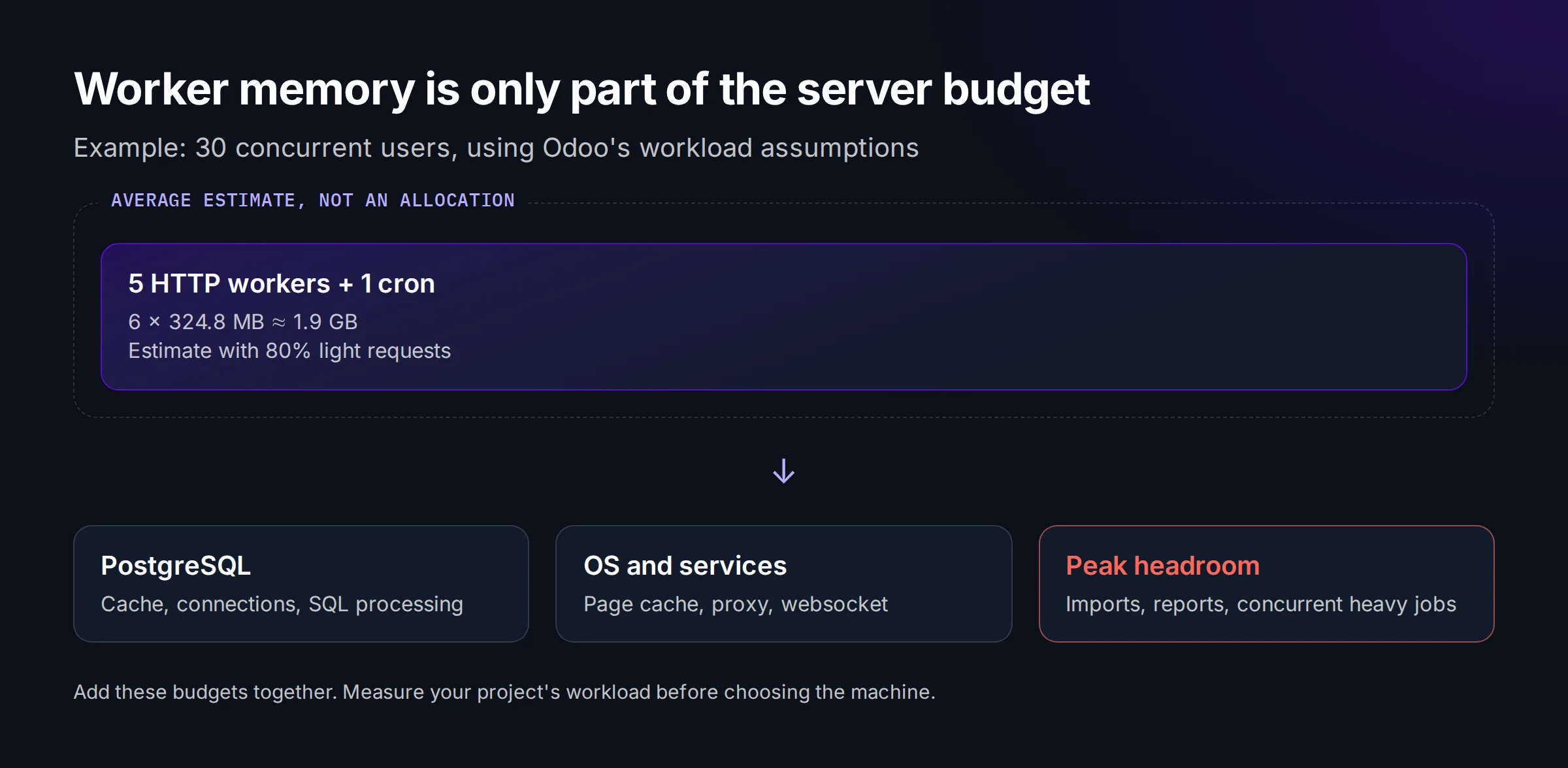
Assume one instance with one cron worker. Use the workload mix in Odoo's example: 80% light requests at roughly 150 MB per worker and 20% heavy requests at roughly 1 GB. Following the example's arithmetic, take 1 GB as 1,024 MB. Estimated average memory per worker is then 0.8 × 150 + 0.2 × 1,024 = 324.8 MB.
| Concurrent users | HTTP workers, rounded up | Including one cron | Estimated memory for those workers only |
|---|---|---|---|
| 20 | 4 | 5 | 1,624 MB, about 1.6 GB |
| 30 | 5 | 6 | 1,948.8 MB, about 1.9 GB |
| 60 | 10 | 11 | 3,572.8 MB, about 3.5 GB |
This excludes PostgreSQL, the OS, the reverse proxy and the dedicated websocket worker. Do not buy from this table. Test the peaks. Several heavy reports running together will not behave like the average request mix.
For 30 concurrent users, the HTTP calculation gives 5 workers. One cron takes the count to 6, while the rule of thumb for 2 CPUs gives only 2 × 2 + 1 = 5. Do not describe 2 CPUs as validated capacity while leaving cron out of the count. On a VPS, check host contention too. A shared vCPU does not guarantee the processor time of a dedicated core.
This calculation makes the excluded processes visible instead of treating a worker subtotal as the specification for the whole server.
Memory limits do not allocate memory#
limit_memory_soft and limit_memory_hard apply to virtual memory per worker on Linux. They are not a global physical RAM budget. The soft threshold causes recycling after the current request; the hard limit can interrupt processing. Neither reserves that amount of RAM for the worker in advance.
The deployment guide's example uses 629145600 bytes for the soft limit and 1677721600 for the hard limit. Those values are 600 and 1,600 MiB. They are example settings, not universal recommendations. Copying them across every worker without checking available memory does not prevent the machine as a whole from running out of RAM.
Measure a representative import, a stored field recomputation and an export against your actual database. A custom module that fetches records in a loop can keep one worker busy while the others are idle. More workers will not fix that query. Inspect the code before buying capacity to hide it.
Budget separately for PostgreSQL and the filestore#
Disk capacity needs to cover more than the backup archive. Add up the database and its indexes, the attachments in the filestore, the logs, and the temporary space that maintenance operations require. Restoring a test copy on the same host creates another copy. Measure first. Only then can you say the existing disk is large enough.
For Odoo 20 installed from source, these are read-only checks. Adapt the PostgreSQL role, replace my_database, and use the data_dir configured for your instance. The SQL query includes the database's indexes:
psql -d my_database -c "SELECT pg_size_pretty(pg_database_size(current_database()));"
du -sh /path/to/data_dir/filestore/my_database
df -h /path/to/data_dir
Account count is a poor disk-sizing metric. A team attaching documents grows storage differently from one mostly entering text. Record the sizes regularly, then compare the trend with your retention requirements. There is no defensible fixed disk allowance per user without knowing what those users store.
PostgreSQL needs its own resources. Connections, SQL sorts and the database cache compete with Odoo workers on a single host, so increasing workers calls for checking the observed connection count alongside db_maxconn and PostgreSQL's max_connections. Skip that check and you may simply move the bottleneck from HTTP processing to database connections.
When to put the database on another server#
Split the components because of measured contention or an operational need. A user-count threshold alone is a weak reason. One machine is simpler to operate and avoids adding a network round trip between hosts for database work.
| What you see during the slowdown | Check first | Will splitting help? |
|---|---|---|
| One busy HTTP worker, others lightly loaded | The query or module doing the work | Usually not |
| PostgreSQL and Odoo competing for memory | Available RAM, swapping and SQL activity | It can isolate their budgets |
| Database work waiting on disk | Storage latency and slow queries | Only with suitable storage |
| Need for independent maintenance | Cutover and restore procedures | It may justify separate hosts |
Keep PostgreSQL on a private network, close to the application. A separate host adds network traffic and another machine to monitor. It will not reduce the query count of a badly written module. Keep the filestore in the backup plan even when the database moves, because the two must stay consistent when you restore them.
What a hosting platform changes#
Your code still consumes CPU. Hosting changes who operates the infrastructure. Our Odoo hosting guide compares the deployment options, while the Ofleet rates page describes how the platform bills resources. The Odoo pricing article gives the yearly cost of each option.
On your own server, the OS, PostgreSQL and backups are yours to run alongside the application. On Ofleet, you control your instances and their configuration through a self-service platform. Testing custom code remains your responsibility. Logs and shell access let you investigate an expensive job; making it cheaper may still require changing the module.
Questions about sizing an Odoo server#
How much RAM does Odoo need for 20 users?#
For 20 concurrent users, the example above gives 4 HTTP workers plus one cron, using about 1.6 GB under Odoo's workload assumptions. That excludes PostgreSQL, the OS, websocket processing and peak headroom. Twenty named accounts with only a few active users are a different workload. Measure concurrency before choosing a server, then test your imports and reports on it.
Which PostgreSQL version does Odoo 20 require?#
Odoo 20 requires PostgreSQL 16 or later. The minimum was 13 for Odoo 19 and 12 for Odoo 18. Moving to Odoo 20 can therefore require a database server upgrade alongside the application and module migration. Check the target environment, required extensions and a restored test copy before scheduling the production cutover.
Can I use Windows for production?#
Use Linux for the multi-process production configuration discussed here. Odoo's multi-process server is unavailable on Windows; the Windows installer suits local testing instead. Debian and Ubuntu are documented installation options if their packages meet your branch's Python and PostgreSQL requirements. Check the libraries used by custom add-ons and PDF reports as part of the installation, not after go-live.
Does Odoo need a dedicated server?#
Not necessarily. A VPS can work if its available resources and storage latency support your measured workload. Dedicated hardware makes sense when resource isolation or closer control of the machine matters. The number of accounts alone does not decide it. Look at peak activity, scheduled jobs and the room you need for growth before committing to either option.
Before settling on production resources, run your own imports and reports on a test instance. You can try Ofleet, inspect the logs and compare how your project's workloads behave.
Read next
 odoohosting
Odoo server maintenance: tasks your team can own
Own your Odoo server maintenance: assign monitoring and backup tasks, test an isolated restore, and record evidence before the next production incident.November 5, 202610 min readBy The Ofleet teamRead article odoohosting
Odoo AWS: deploy on EC2 and budget for recovery
Odoo AWS deployment on EC2: choose PostgreSQL or RDS, protect internal ports, pair database and filestore backups, and calculate a dated monthly budget.November 5, 20268 min readBy The Ofleet teamRead article odoohosting
Odoo Docker: from Compose to a working restore
Odoo Docker with Compose: run Odoo 20, route websocket traffic, back up PostgreSQL and the filestore together, and check a restored attachment.November 3, 20269 min readBy The Ofleet teamRead article