
Blog
Odoo server maintenance: tasks your team can own
By The Ofleet team10 min read
Contents
Odoo server maintenance covers the work that keeps an instance running: monitoring, backups, recovery, updates and access control. You can own that work as a team, either on your own server or through a self-service hosting platform. You still need someone who receives the alert, someone who can restore the data, and someone authorized to accept the result.
Start with evidence, not a service checklist. Can you show that an alert reached a person? Can you open an attachment after a restore? This guide explains what to assign and what to record for an Odoo instance with custom modules. Technical settings refer to the Odoo 19 documentation, for Community and Enterprise, read on November 5, 2026. This is about operating the server, not Odoo's Maintenance app for equipment.
Assign Odoo server maintenance to people who can act#
Your team decides what needs to work and how to check it. The operator might be an employee, a module developer or an external provider. Write down a person's name and a backup contact rather than assigning the job to “IT.”
Use this register as a starting point. The last column contains decisions for your team, not service commitments or universal schedules.
| Task | Owner to appoint | Evidence to keep | Frequency to decide |
|---|---|---|---|
| Monitor the instance | Alert recipient and backup contact | Delivered test alert, assigned incident | Automated checks and response hours |
| Back up the data | Person who checks the copies | Recent backup with database and filestore | Based on acceptable data loss |
| Restore a backup | Operator and acceptance tester | Report, measured duration, opened document | Based on risk and changes to the backup process |
| Apply updates | Administrator and custom module developer | Copy tested, rollback prepared | Based on patches and change windows |
| Review access | Named administrator | Accounts and permissions checked | After departures and at an agreed interval |
Add the last verification date and the next one due. Then check the handover. A colleague covering your vacation needs working credentials and a usable procedure before you leave, not a name added to a spreadsheet when the server is already down.
The boundary depends on your hosting model. Managing the operating system does not include testing your custom modules, and maintaining those modules does not mean receiving disk alerts. Our guide to Odoo hosting options explains those boundaries. If Odoo Online supports everything you need, running a server yourself adds work without answering a need for custom code.
Monitor a user workflow as well as the endpoint#
A successful HTTPS check tells you less than a successful user action. Keep both. Use a low-privilege test account to check a permitted screen or a document reserved for monitoring. Avoid probes that create business transactions just to prove that the application responds.
The Odoo 19 deployment documentation (nouvel onglet) discusses resource monitoring and login logs. It does not define your escalation rules. Turn each signal into a first investigation step and keep enough context for the next person to continue.
| Signal | First checks | Evidence to keep |
|---|---|---|
| The website is unreachable | DNS, certificate, reverse proxy, Odoo process | Time and result of the external check |
| A screen is slow | CPU, memory, PostgreSQL connections and locks | Metrics and logs from the same period |
| A scheduled job is waiting | Last cron run, Python errors, external service | Job identity and last known success |
| Free disk space is falling | Database, filestore, logs, local backups | Available space over time |
Test alert delivery without taking production offline: make a dedicated probe fail, confirm that a person receives the notification, and ask them to find the relevant logs using their own account. An unread shared inbox cannot investigate an outage.
Choose thresholds after observing normal activity, including imports and scheduled processing. Resist the reflex to add workers whenever a screen gets slow. A database lock needs a different response from a shortage of CPU capacity. Record what was happening before changing the instance size, or you lose the context needed to explain the incident later.
Back up the database and its matching filestore#
An Odoo backup needs the PostgreSQL database and the corresponding filestore content. A SQL dump alone cannot bring back attachments stored on disk. Odoo's deployment documentation recommends daily backups of both, copied to a remote archive server that the production server cannot access.
Daily is the documented starting point, not a promise that it fits your business. Ask users how much work they could afford to re-enter after losing production data. That defines the recovery point objective, or RPO. Select a backup approach against that objective, then inspect the copies you actually have rather than treating the configured schedule as proof.
Record the backup's reference time, Odoo version and custom module revision. Include a way to recover the configuration and required dependencies. Restoring yesterday's database with incompatible code can fail before anyone reaches the login screen.
Check where recovery credentials live. If opening the password vault requires the same server you are trying to recover, your procedure has a dependency loop. Resolve it before the incident. Keep credentials in your team's approved secret store, away from screenshots, monitoring tickets and the operations register.
A green backup job shows that a program completed. Verify the resulting files, their dates and sizes, and the remote transfer result as well. An unexpected size change deserves investigation. Do not automatically erase older copies because the latest backup looks different: those older copies may be the ones you need.
Restore into isolation and document what you recovered#
A restore test ends with verified data and a usable application. Getting Odoo to start is only part of it. Pick a document before taking the backup, then open it in the recovered instance and check a representative workflow with an authorized user. An attachment check helps expose a database and filestore mismatch.
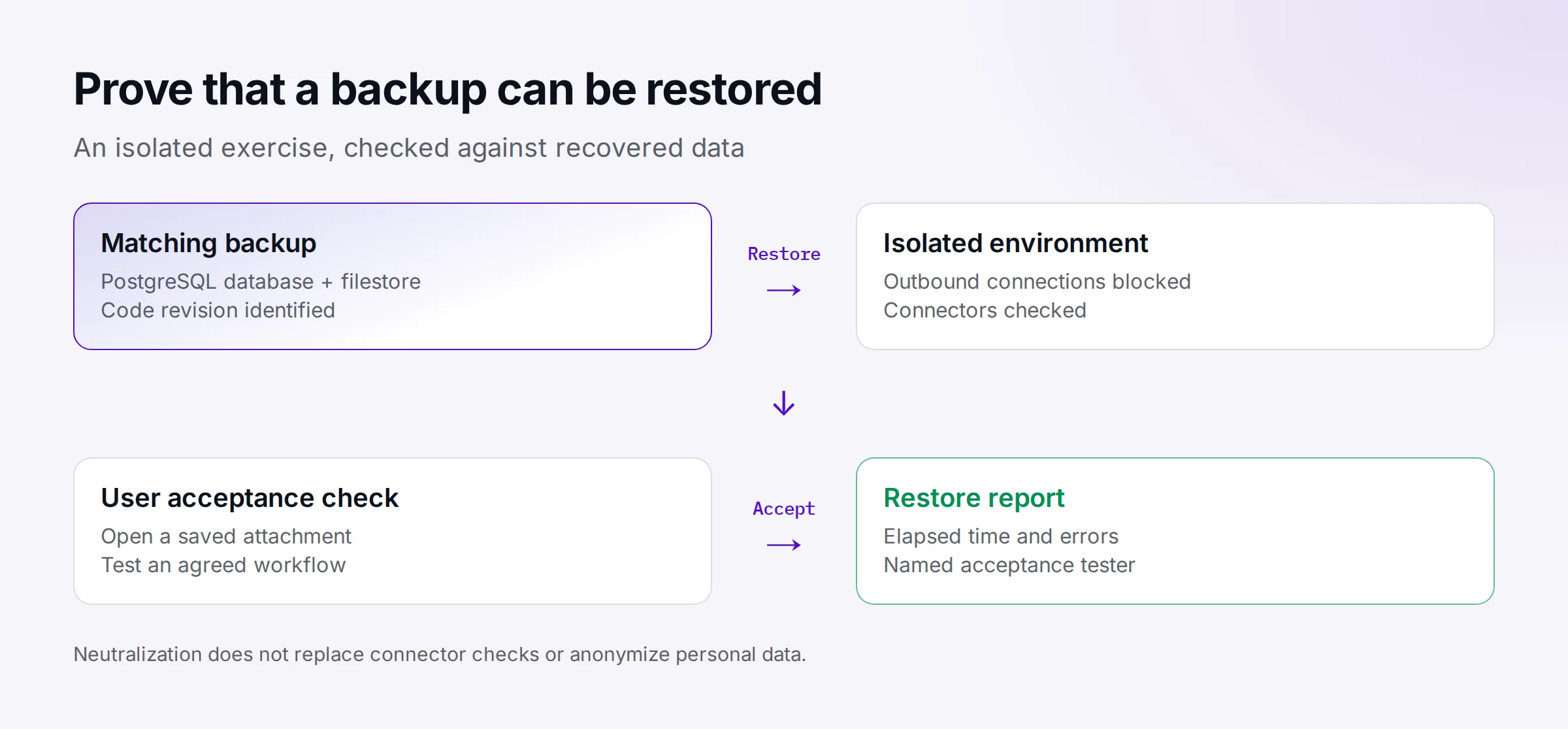
Agree on this sequence with the person who will accept the recovered application:
- Choose the backup and record its reference time. Locate the matching code revision before starting recovery.
- Prepare a separate environment. Block connections to live external services before Odoo starts, including any custom connectors.
- Restore the database and filestore using your hosting platform's method. Never overwrite production just to check a backup.
- Start Odoo, inspect the logs, open the selected attachment and exercise the agreed workflow with a permitted account.
- Record the start time, the point at which the application becomes usable, any errors and the acceptance tester's name. Fix failed steps and run those checks again.
Odoo's neutralized database documentation (nouvel onglet) lists disabled features including scheduled actions, outgoing email and several integrations. The list is explicitly non-exhaustive. Do not assume every restore method automatically neutralizes the result, or that neutralization covers connectors written for your project. Check the copying mechanism and keep network restrictions in place until you have verified outbound behavior.
Neutralization also leaves personal data in the database. Restrict access to the test environment and set a deletion date for the copy. If a test requires a scheduled action, point it at a mock service or an explicitly configured test destination before re-enabling it. Disabling automation is different from anonymizing records.
Our Odoo Docker tutorial demonstrates a restore into a separate Compose project. That exercise does not prove you can recover from losing the host itself. For that scenario, also test recovery on another machine using the remote copies and credentials you would have after a host failure.
Patch a copy before changing production#
An update needs a tested way back. Keep an Odoo patch, an operating system or PostgreSQL update, and an upgrade to a different Odoo version as separate change types. Each can affect a different part of your application; one successful smoke test cannot cover them all.
Start patch testing with a recent, isolated copy and the code you plan to deploy. Check the screens affected by the change and your custom modules. Logging in successfully does not validate an import, a scheduled calculation or document generation. Ask the people using Odoo which workflows would reveal a failure, then select tests that cover the actual change.
Write the stop conditions before the production window. A startup failure is an obvious one, but an agreed workflow failing or an intervention exceeding its window can also justify stopping. Name the person authorized to make that call. Otherwise the team may spend the outage waiting for permission in a chat thread.
Rollback must cover both code and data. If the update changed the database schema or its contents, replacing the code may not undo it; prepare a matching restore and decide what happens to business writes made after the change. Those writes may be lost. Get the business owner to accept that risk before proceeding.
Record the deployed revision, checks performed and outcome in the operations log. “Updated the server” is not enough detail to help the next operator work out what changed. Keep the record short, but make it reproducible from the references you provide.
Check recovery access and agree on response hours#
Ask each named operator to verify their own access before they need it. That includes the tools used when the application is unavailable, not just an Odoo administrator login. Remove access that is no longer required. A shared administrator password makes handovers harder to trace and is a poor substitute for assigning responsibility.
For an internet-facing Odoo 19 installation, the deployment documentation recommends disabling the database manager. It describes list_db = False and database filtering with dbfilter. Enable proxy_mode only behind a reverse proxy. Check the exposed routes from outside after making the change. The saved configuration file does not prove the running service is using it.
Our Odoo security checklist covers those checks in more detail. If your platform manages the reverse proxy or PostgreSQL, identify which settings it exposes and which tasks it handles. Do not write a recovery procedure around root access that your hosting plan does not provide.
Decide what happens outside working hours. A team with nobody available overnight cannot honestly promise an overnight recovery. You can accept that limit, arrange coverage or delegate a defined task. Buying managed operations is a staffing and scope decision; it does not automatically transfer acceptance testing for your custom modules.
When comparing a provider's commitments, read the wording. The Odoo Cloud SLA (nouvel onglet) distinguishes availability and recovery objectives from legally binding guarantees. Its targets belong to that service, not to your own server or Ofleet. Your recovery time objective, or RTO, is the recovery duration your organization has agreed to aim for. A favorable drill result is evidence about that particular exercise, not a guarantee for every outage.
Put the next operations exercise on the calendar#
Choose an item in your register that has no supporting evidence yet. Assign the owner, arrange access and set a date. For backups, the first task might be locating a remote copy and the associated code revision. That modest check can expose missing dependencies without touching production, and gives the next person a concrete starting point.
Ofleet lets you manage Tests and Production instances yourself, with instance cloning, logs and a browser shell. You can try Ofleet with your project to inspect those tools. Keep your register beside the console: choosing the acceptance tests and deciding who answers an alert remain your team's work.
Read next
 odoohosting
Odoo AWS: deploy on EC2 and budget for recovery
Odoo AWS deployment on EC2: choose PostgreSQL or RDS, protect internal ports, pair database and filestore backups, and calculate a dated monthly budget.November 5, 20268 min readBy The Ofleet teamRead article odoohosting
Odoo Docker: from Compose to a working restore
Odoo Docker with Compose: run Odoo 20, route websocket traffic, back up PostgreSQL and the filestore together, and check a restored attachment.November 3, 20269 min readBy The Ofleet teamRead article odoohosting
Odoo security: a verifiable self-hosting checklist
Odoo security for self-hosted instances: verify database manager isolation, proxy settings, two-factor authentication and recoverable backups.November 2, 20266 min readBy The Ofleet teamRead article